Warning: Use of undefined constant flag - assumed 'flag' (this will throw an Error in a future version of PHP) in /home/users/1/pranktone/web/pranktone.net/blog/wp/wp-content/themes/prag/functions.php on line 645

Warning: Use of undefined constant registered - assumed 'registered' (this will throw an Error in a future version of PHP) in /home/users/1/pranktone/web/pranktone.net/blog/wp/wp-content/themes/prag/functions.php on line 646

Warning: Use of undefined constant nonce - assumed 'nonce' (this will throw an Error in a future version of PHP) in /home/users/1/pranktone/web/pranktone.net/blog/wp/wp-content/themes/prag/functions.php on line 647

Warning: Use of undefined constant category - assumed 'category' (this will throw an Error in a future version of PHP) in /home/users/1/pranktone/web/pranktone.net/blog/wp/wp-content/themes/prag/functions.php on line 648

Warning: Use of undefined constant tag - assumed 'tag' (this will throw an Error in a future version of PHP) in /home/users/1/pranktone/web/pranktone.net/blog/wp/wp-content/themes/prag/functions.php on line 649

Warning: Use of undefined constant search - assumed 'search' (this will throw an Error in a future version of PHP) in /home/users/1/pranktone/web/pranktone.net/blog/wp/wp-content/themes/prag/functions.php on line 650

Warning: Use of undefined constant author - assumed 'author' (this will throw an Error in a future version of PHP) in /home/users/1/pranktone/web/pranktone.net/blog/wp/wp-content/themes/prag/functions.php on line 651

Warning: Use of undefined constant is_single - assumed 'is_single' (this will throw an Error in a future version of PHP) in /home/users/1/pranktone/web/pranktone.net/blog/wp/wp-content/themes/prag/functions.php on line 652
Mac

[Mac]思い立ったときにブラウザを開くのはSpotlightを使うのが便利、、、な気がする。

by pranktone
アイデア使い方

この記事は2012年3月13日に書かれたもので、内容が古く現在では推奨されていない方法の可能性もありますのでご注意ください。
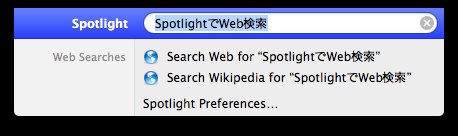
Spotlight

どこかの記事で、iPhoneのWeb検索を思い立ったときに
ホームボタンクリックで、検索にフレーズ入れて
Webで検索っていうフローが便利っていうのを見たので、
Macでもできるんじゃないかと思ってやってみた。

記事のタイトルで言い切ってしまっているけど、
Spotlightをショートカットで起動して、
検索ワードを入力、Webで検索っていうフロー。

ただ、コレをやろうと思うとSpotlightの検索対象とかの
設定を調整しないと検索候補の一番下の方に「Webで検索」
が出てくるので、デフォルトの設定でやると、あんまり効率的じゃない。

大体ブラウザは常時起動してるしで。。。

ただ、ブラウザを開いていないときとか、
ブラウザを開いているデスクトップとは
他のデスクトップで開いているときには
ちょっとだけ有効。

気持ちですけど。

同じ方法で、
調べたい言葉があったときに
「Wikipediaで検索」とか「辞書」を
使うと、ほんと、ほんの少しだけ便利。

feedly

コメント

まだ、コメントはありません。

トラックバックURL

https://blog.pranktone.net/gadget/mac/20120313200005.html/trackback
ありきたりな日常と
それとない非日常を
紡ぐ記録
SKIP