Warning: Use of undefined constant flag - assumed 'flag' (this will throw an Error in a future version of PHP) in /home/users/1/pranktone/web/pranktone.net/blog/wp/wp-content/themes/prag/functions.php on line 645

Warning: Use of undefined constant registered - assumed 'registered' (this will throw an Error in a future version of PHP) in /home/users/1/pranktone/web/pranktone.net/blog/wp/wp-content/themes/prag/functions.php on line 646

Warning: Use of undefined constant nonce - assumed 'nonce' (this will throw an Error in a future version of PHP) in /home/users/1/pranktone/web/pranktone.net/blog/wp/wp-content/themes/prag/functions.php on line 647

Warning: Use of undefined constant category - assumed 'category' (this will throw an Error in a future version of PHP) in /home/users/1/pranktone/web/pranktone.net/blog/wp/wp-content/themes/prag/functions.php on line 648

Warning: Use of undefined constant tag - assumed 'tag' (this will throw an Error in a future version of PHP) in /home/users/1/pranktone/web/pranktone.net/blog/wp/wp-content/themes/prag/functions.php on line 649

Warning: Use of undefined constant search - assumed 'search' (this will throw an Error in a future version of PHP) in /home/users/1/pranktone/web/pranktone.net/blog/wp/wp-content/themes/prag/functions.php on line 650

Warning: Use of undefined constant author - assumed 'author' (this will throw an Error in a future version of PHP) in /home/users/1/pranktone/web/pranktone.net/blog/wp/wp-content/themes/prag/functions.php on line 651

Warning: Use of undefined constant is_single - assumed 'is_single' (this will throw an Error in a future version of PHP) in /home/users/1/pranktone/web/pranktone.net/blog/wp/wp-content/themes/prag/functions.php on line 652
Mac

[Ai]Macの言語設定を英語にしたら、Illustratorが起動しなくなった話

by pranktone
使い方

この記事は2012年3月9日に書かれたもので、内容が古く現在では推奨されていない方法の可能性もありますのでご注意ください。

Macのメニューを英語化したのはよかったものの、
Adobe系のソフトは英語化できず。
やっとこさPhotoshopは英語化できたことを
[Mac]Macのメニューを英語化しつつ、Photoshopのメニューも英語化にて
お伝えしましたが、illustrator開いてみたら、
文字化け、あげく起動しなくなりました。

どうやら日本語環境でしか開かないようで、
たぶん、ディレクトリ名とかが日本語で
インストールされているので、その辺が関係しているのではないかと
推測しているわけですが、それがなんの解決にもならず。

インストール時に英語環境だったらいけるのかな。
そこまではめんどくさくてやってないです。

Photoshopと同様に設定ファイルをいじれば何とかいけるかと思って、
いろいろ探してみたものの決定打となるファイルにたどり着けず(汗。

とりあえず、以前紹介した

TJ-HD Software – Language Switcher

をインストールして設定したところうまくいきました。

上記ページよりダウンロードインストールします。

起動時点では illustrator はリストにないので、
「Command + A」かFile> Add… から
illustrator.appを選択して追加します。
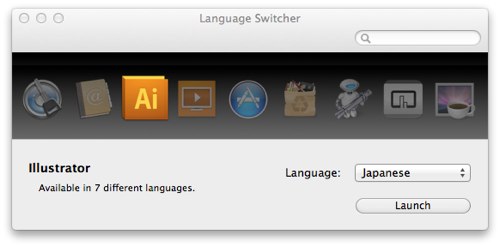
Language Switcher

Languageの選択から、「Japanese」を選択、
その後、同じくLanguageの選択で一番上にある、
「Always open in this language」を選択。
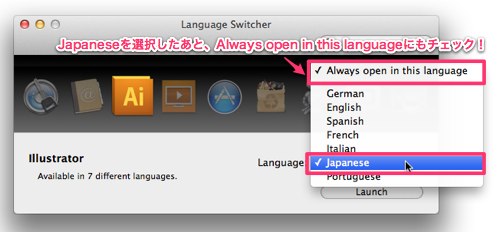
Language Switcher

これで、アプリケーションを起動するときは
毎回日本語で開く設定が完了です。

ってか、選択のところに他にも選択できる言語が
あるってことは、なんかどうにかしたら、英語にできそうな気もするけど。

とりあえず、起動するようになったので、良しとします。

feedly

コメント

まだ、コメントはありません。

トラックバックURL

https://blog.pranktone.net/gadget/mac/20120309210002.html/trackback
ありきたりな日常と
それとない非日常を
紡ぐ記録
SKIP